Peter-Pon

Peter-Pon · OpenWrt firmware for the Huawei MA5671A GPON SFP stick and its sister modules

Peter-Pon: This one
goes to
eleven.

0 1 2 3 4 5 6 7 8 9 10 11

PONO5Operation

Most dials stop at ten.

A complete fibre modem that fits in an SFP cage, shipped on a 2014-era Linux. Peter-Pon puts it on a 2026 kernel, hands the second CPU core back to Linux, brings an OMCI engine of its own, and shows you everything inside, live. Modern OpenWrt on a GPON module that refuses to grow old.

Start at one

Linux kernel
was 3.10.496.18.55
CPU cores Linux runs on
was 12
Instruction cache Linux can use
was 8 KiB32KiB
Boot to first answer on the LAN
was 53.1 s31.1s
Reading 7.25 MiB of flash
was 3.18 s0.54s

Struck through: how the stock firmware runs the same hardware. Each chapter says how its numbers were measured.

01The stick

A whole fibre modem in an SFP cage.

The Huawei MA5671A is a complete GPON terminal, an ONT, built into an SFP module. Fibre goes in one end. The other end goes into your router's SFP cage, and the module takes the place of the operator's box.

It is also a computer: a FALC ON system-on-chip with a MIPS 34Kc core, 64 MB of RAM and 16 MB of flash. It runs Linux. Until now, a very old one.

Peter-Pon is what it runs instead: OpenWrt main on Linux 6.18.55 with musl, the GPON drivers updated for that kernel, an OMCI engine of its own, its own tools and web pages.

123456
  1. Fibre in. 1490 nm down, 1310 nm up.
  2. The optics. One laser, one photodiode.
  3. The FALC ON chip. The CPU, the GPON MAC and the packet engine in one.
  4. 64 MB of RAM.
  5. 16 MB of flash. Boot loader, its settings, two firmware slots.
  6. The SFP edge. Into the router. On the MA5671A the chip also plays the SFP's EEPROM: there is no EEPROM chip.

Illustration Not to scale.

Diagram Where the stick sits. To the left it speaks GPON and OMCI to the operator's equipment; to the right it hands your router an Ethernet link.

One image, three board designs, five models. Huawei MA5671A, Nokia G-010S-P and FS GPON-ONU-34-20BI are one board; Zyxel PMG3000-D20B and Nokia G-010S-A are the other two. The G-010S-A path is experimental: it has not run on a real module yet.

02Live, as it really runs

Watch it run.

Before the numbers, the thing itself. These are the firmware's own pages, moving the way they move on the module: one sample a second, drawn in the browser.

Nothing below was animated for this site.

Real page Status › Realtime GraphsTraffic, optics, temperatures and errors, one sample a second, with every change of the PON state marked on every chart. Five minutes, an hour or a day; pause it, or take the samples away as CSV.
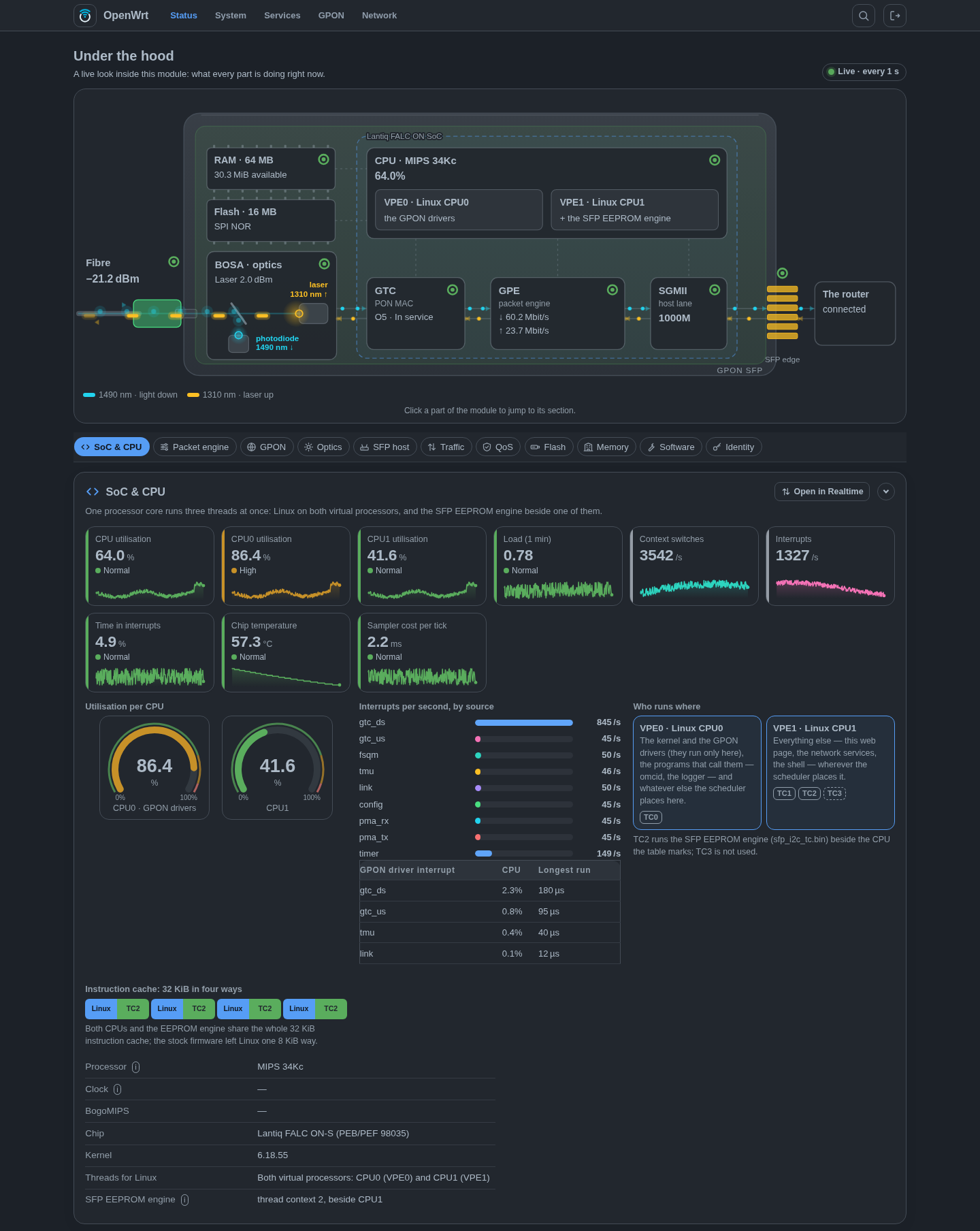
Real page Status › Under the hoodThe firmware's live diagram of the module: light in and laser out through the optics, the GPON MAC, the packet engine, the lane to the router, and both CPUs. Click a part and the page jumps to its section.
  • Real page, simulated unit Both recordings are the firmware's real pages, served by its real web stack. The unit behind them is simulated: a module in service, with made-up traffic. The pages are real; the readings are not measurements.

03Why it exists

Stuck in 2014.

The stock firmware is OpenWrt 14.07 on Linux 3.10.49 with uClibc 0.9.33. Upstream OpenWrt boots on the chip but carries no GPON drivers, so the firmwares we started from stayed on the old kernel.

Peter-Pon moves the whole stack to today's OpenWrt, and then keeps going.

What the stock firmware left on the table

  • One CPU for Linux. The second virtual processor ran a small EEPROM program that never sleeps.
  • A quarter of the instruction cache for Linux. One 8 KiB way of 32 KiB.
  • Flash read four bytes per command.
  • After a watchdog reset, no record of why.
  • No way to read the flash chip's own health.
Stock: the firmware lineage the MA5671A shipped with. Peter-Pon: the last release, r681.
WhatStockPeter-Pon
OpenWrt14.07main
Linux3.10.496.18.55
C libraryuClibc 0.9.33musl
GPON driversbuilt for Linux 3.10updated to run on Linux 6.18
OMCI daemonthe stock oneour own
CPUs for Linux12
Instruction cache for Linux8 KiB32 KiB
Flash reads50 MHz, 4 bytes per command100 MHz, four lines, memory-mapped
After a crashnothing keptconsole and oops kept in RAM

04The set-up

Type the identity. It does the rest.

A GPON line is run over OMCI. The operator's OLT questions whatever sits at the end of the fibre, then decides which services to set up, and how.

Peter-Pon's own OMCI engine answers the way the ONT your operator expects would answer, from a library of 91 devices in eight OMCI software families. You type the identity; the engine works out the rest.

The ONU Configuration page lays that out as three steps, left to right, from the operator to your router. Each step shows where it stands.

  1. AuthenticationThe serial number, and the password or LOID if your line uses one. This is the part you type.
  2. What the OLT seesThe ONT model the module answers as. Automatic picks it from the library; Expert mode lets you open it up and change it.
  3. DeliveryEvery service the OLT sets up, as one lane to your router. Click a lane's router side to change how that service arrives.

Diagram The strip across the top of the ONU Configuration page, redrawn. The recordings below are the page itself.

Real page GPON › ONU ConfigurationAuthentication, What the OLT sees, Delivery: the three steps and the tab behind each. The strip fills in from left to right as the line comes up.
Real page GPON › Connection, the delivery lanesOne lane per service: what the OLT set up, what the module does, what the router gets. How a service reaches the router is the OLT's call first. Where you want it another way, click the lane's router side and choose: as the OLT set it up, untagged, or another VLAN.

Every service goes to the router

Internet, TV, voice: whatever the OLT provisions is delivered to the router's port the way the OLT configured it. Nothing ends on the stick.

The Connection page draws one coloured lane per service: the operator's VLAN on the left, what the router gets on the right, what the module does in between. Five steps from light to traffic, and a plain sentence when one of them fails.

Behind that sentence is an assistant with 39 stage codes and 32 findings. Most people will only ever see “Fibre link up”.

OLT

Who made you?Vendor ID

the operator's ONT maker

Module
OLT

Which model?Equipment ID

its model

Module
OLT

Which hardware version?ONT Version

its hardware version

Module
OLT

Then here are your services.

Illustration The exchange is simplified, and the answers are placeholders for the values of the ONT your operator expects.

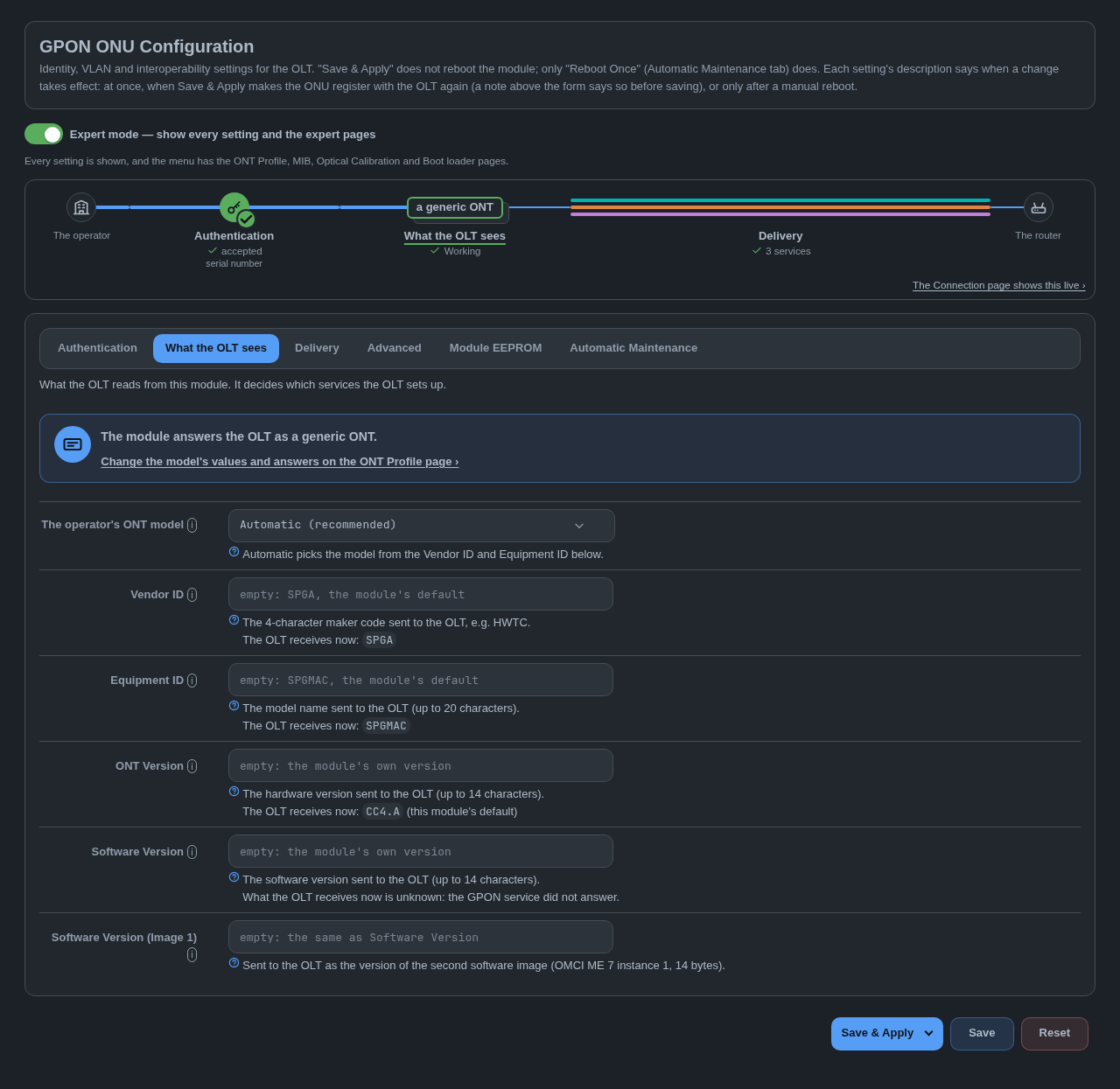
The ONU Configuration page, tab 'What the OLT sees': the model the module answers as, how it was chosen, and the values the OLT receives now.
Real page ONU Configuration › What the OLT sees. The model the module answers as, and under every field the value the OLT receives now.
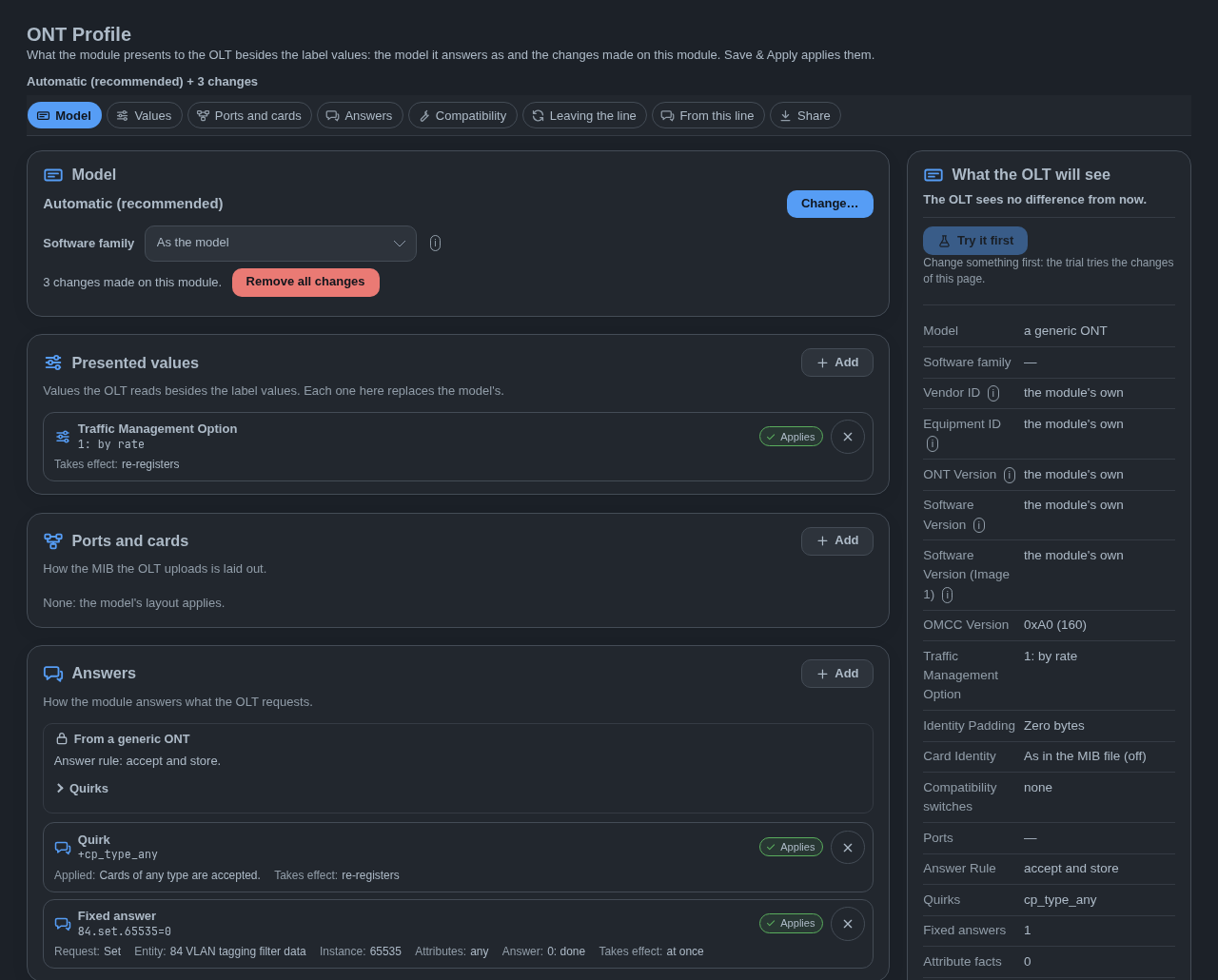
The ONT Profile page: the model, the values it presents, its answers, and a panel 'What the OLT will see'.
Real page ONT Profile (Expert). The same model, opened up. Change a value, try it, and keep it only if it works.
  • Counted 91 devices and 8 families are the library in the source tree today. The last release, r681, shipped 87 devices in 6 families.
  • Checked 37 recorded OLT sessions are replayed through the engine by an automatic check and compared with their expected results.
  • Real page, example data The pages in this chapter are fed by the project's test fixtures or by a simulated unit. The services, VLANs and names on them are examples.

05 – 07The hardware

Same silicon. More machine.

Nothing was added to the board. A second virtual processor, three quarters of the instruction cache and a faster flash bus were in the chip all along.

Each change in the next three chapters was measured before and after. Flip the switches yourself.

05The second CPU

We got a CPU back.

The 34Kc has two virtual processors and four hardware thread contexts. The stock firmware ran Linux on one. The other ran its SFP EEPROM program: about 900 instructions in a loop with no wait, answering the router's I2C reads, because the stick has no EEPROM chip and the chip has to play one.

The project owner's instruction, verbatim: “our firmware goes to eleven. this means SMP”.

So the EEPROM emulation was rewritten as our own engine and moved to a spare thread context, where it sleeps until the router reads. The freed virtual processor became Linux's second CPU. The kernel says so at boot: smp: Brought up 1 node, 2 CPUs.

One catch. The GPON drivers were written for one CPU. So they run only on CPU0, an island: every entry point is pinned there, an automatic check stops the build if a new one is not, and a runtime tripwire counts violations. CPU1 runs everything else.

One CPU. One loop that never sleeps.Two CPUs. One engine, asleep.

MIPS 34Kc · two virtual processors · four hardware thread contexts

TC0
Linuxthe only CPU the kernel has
Linux · CPU0and the GPON drivers, which run only here
VPE0VPE0
TC1
The stock EEPROM programabout 900 instructions, looping, no wait
Linux · CPU1everything that is not a GPON driver
VPE1VPE1
TC2
Halted
Our EEPROM engineasleep in WAIT until the router reads
unusedVPE1
TC3
Halted
Halted
unusedspare
Diagram Who runs on which hardware thread. Simplified: it shows who gets what, not the circuit.
CPUs Linux runs on
was 12
Same image, boot to LAN
was one CPU: 39.91 s35.2s
Router EEPROM reads that failed
 0 / 215
  • Measured With the module in a router's SFP cage: 0 of 15 cold and 0 of 200 warm reads by the router failed; the engine counted 539 I2C STARTs, 0 answered late.
  • Measured One image booted with and without nosmp: 39.91 s against 35.21 to 35.27 s to the first LAN answer. Cost: 128 KiB more kernel in flash.
06The cache

Linux was living in a quarter of the cache.

The L1 instruction cache is 32 KiB in four ways of 8 KiB, and it can be split between the two virtual processors. On the stock firmware the split meant for the EEPROM program landed on the side that runs Linux, and Linux ran from one way.

We found it by reading the register back, and a cache benchmark put the knee at 8 KiB. First fix: three ways. Second: all four, shared.

8 KiB for Linux.32 KiB for Linux.

L1 instruction cache · four ways of 8 KiB

8 KiBLinuxLinux
8 KiBnot for LinuxLinux
A system call1.79 µs0.75 µs
A fork1.47 ms1.06 ms
A pipe round trip181 µs60 µs
Measured A/B inside one boot. One way to three: the system call, the fork, and the pipe from 181 to 88 µs. Three ways to four: the pipe from 88 to 60 µs, and sh -c : from 10.0 to 8.7 ms.

And while we were in there

  • 16 KiB pagesNo more data-cache aliasing; fork, exec and page faults about 1.4 to 5 times cheaper. It costs 8 to 12 MiB of available memory.
  • EROFS rootReads 25 % faster than the xz squashfs it replaced.
  • RAM given backStock hid 1 MiB from Linux for the EEPROM program. Now 16 KiB stays hidden.
  • A crash record64 KiB of RAM that survives the watchdog reset: the last console lines are still there after the reboot.
  • A web UI that loadsLuCI's cold load, 41 requests: 5.77 s to 1.66 s.

07The flash, and the boot

100 MHz, four lines. Then we raced it.

The stock driver reads the flash four bytes per command at 50 MHz: 2,335 KiB/s. Peter-Pon reads it through the SPI controller's memory-mapped window, at 100 MHz, on four data lines. The boot loader got the same clock, and loads the kernel in 1.56 s instead of 3.68.

A modern kernel is heavier than a 2014 one: on this chip a system call, a fork or an exec cost 1.7 to 2 times what they did on 3.10. The work in these three chapters is part of how the boot still ended up shorter.

The flash read

7.25 MiB, played back at real speed.

Stock read method · 50 MHz, 4 bytes per command3.18 s
Peter-Pon · 100 MHz, four lines, memory window0.54 s

5.9×3.18 s divided by 0.54 s.

The boot race

Both firmwares, one bench unit, replayed at 4× speed.

Peter-Pon · Linux 6.1831.05 s
    Stock-lineage firmware · Linux 3.1053.14 s

      On the network 22.1 s sooner.

      • Replay The flash bars play back two measured durations: dd of one 7.25 MiB flash partition on the bench unit, before (3.18 s) and after (0.54 s; 0.89 s on two lines). The before figure is the stock read method at the stock clock, measured on our own kernel before the change.
      • Replay The race is not a live recording. Its milestones are host-clock times read from the serial captures of two flash boots of the same bench unit, from the boot loader's boot command to the first ping answer: the stock-lineage firmware on 2026-09-27 and Peter-Pon r650 on 2026-10-14.

      08The controls

      Nothing on this device is out of reach.

      Peter-Pon gives you the whole machine, with a label on every control and a lock on the ones that can strand it.

      Twelve pages of its own in LuCI, in Simple and Expert modes, on five themes, in English with five more languages as packages. One static program, omng, that holds every tool. And a logger whose brief was three words long: “we want everything”.

      omng flash_mapflash_healthslot_inspectuboot_inspectstick_idprofilevlan_hwus_grantgoi_decodegtopotopagent

      The OMCI database entity by entity, the queues and shapers the OLT set up, the flash chip's own health registers, the firmware slot you are not running: each has a page or a command. Click any screen on this page to see it larger.

      Real page GPON › MIB, the explorerThe whole OMCI database, to explore: what the OLT provisioned, what the template brought, what the module added. The graph runs from the T-CONTs through the GEM ports and bridge ports to the module's ports. Click a box and that entity is decoded attribute by attribute, with its pointers to follow and the OMCI message that set it. Search, and the rest of the graph dims.
      Real page Under the hood › QoS & provisioning. Speeds and priorities as a flow: a service, its priority bits, the GEM ports with their limits, the queues, the T-CONT. Below it, what the OLT asked for against what the chip really holds, and the upload shapers with their live buckets.
      The Under the hood page: the live diagram of the module, then the SoC and CPU section with small charts, two CPU gauges, the interrupt table and who runs where.
      Real page Under the hood. A section per part of the module.
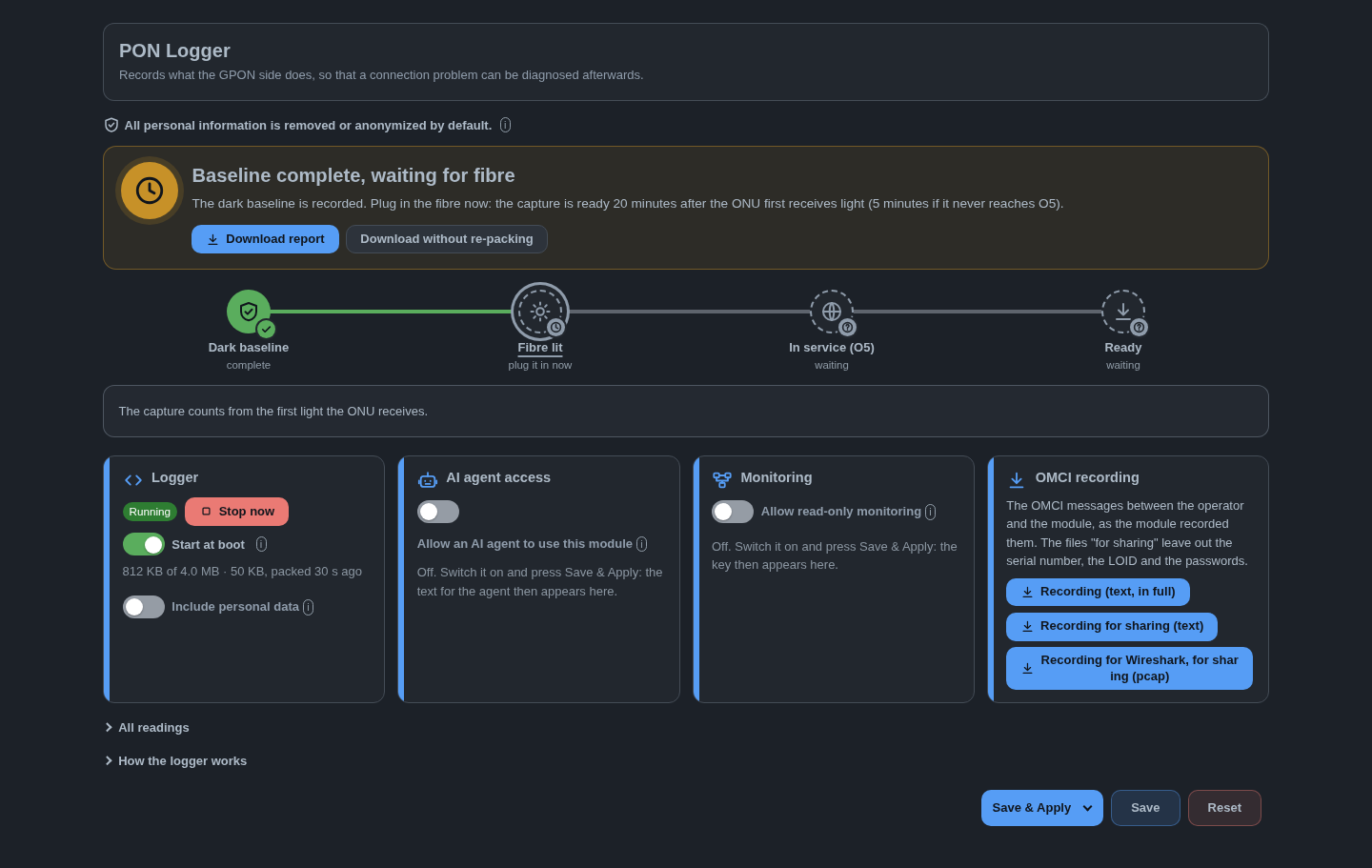
      The PON Logger page: capture steps from dark baseline to ready, and four panels: Logger, AI agent access, Monitoring, OMCI recording.
      Real page PON Logger. Records the GPON side and packs a report; personal data is stripped by default.
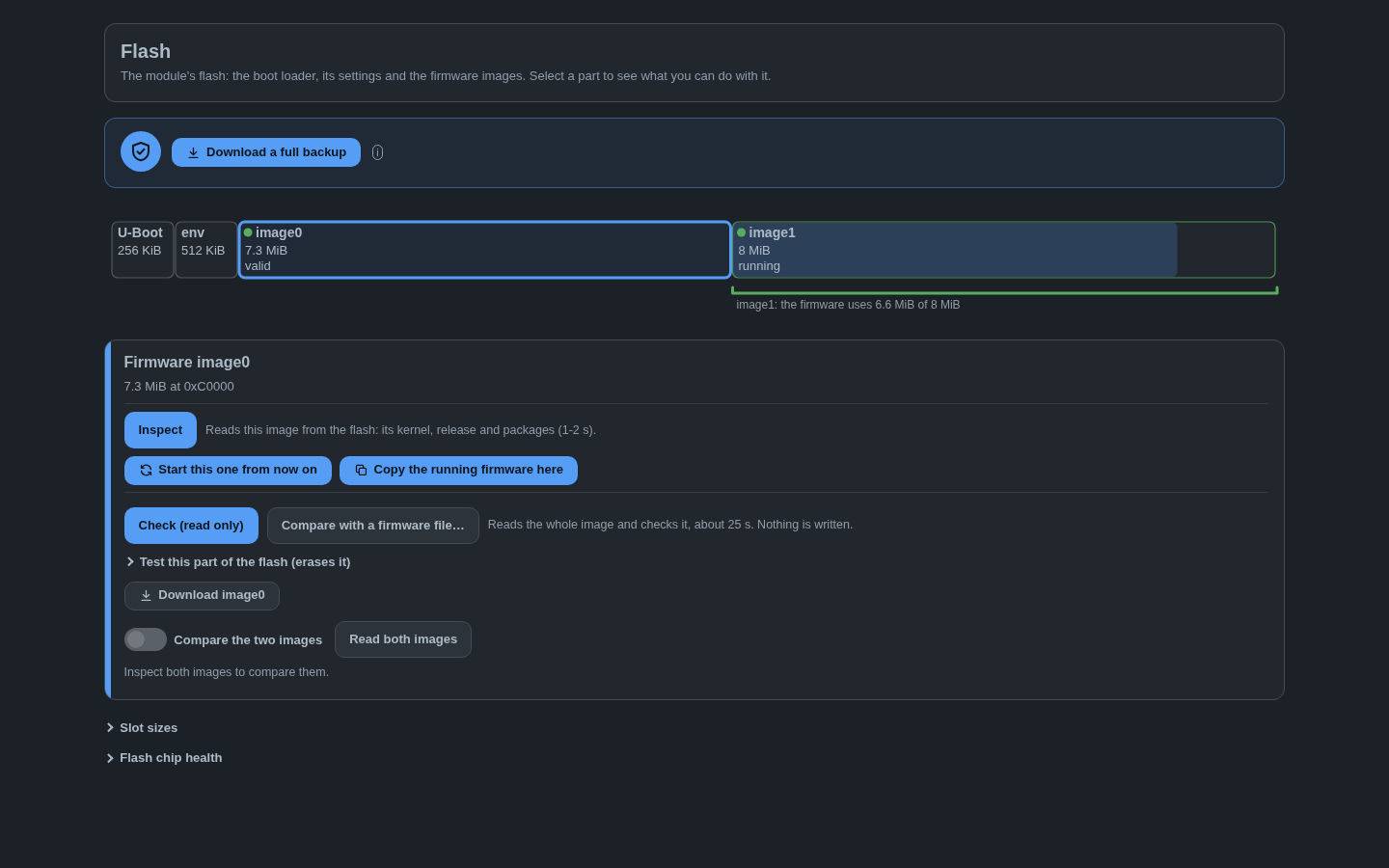
      The Flash page: a map of the flash with the boot loader, its settings and two firmware images, and the actions for the selected image: inspect, start this one from now on, copy the running firmware here, check, compare, download.
      Real page Flash. The 16 MB part as a map: inspect, check, copy, back up.
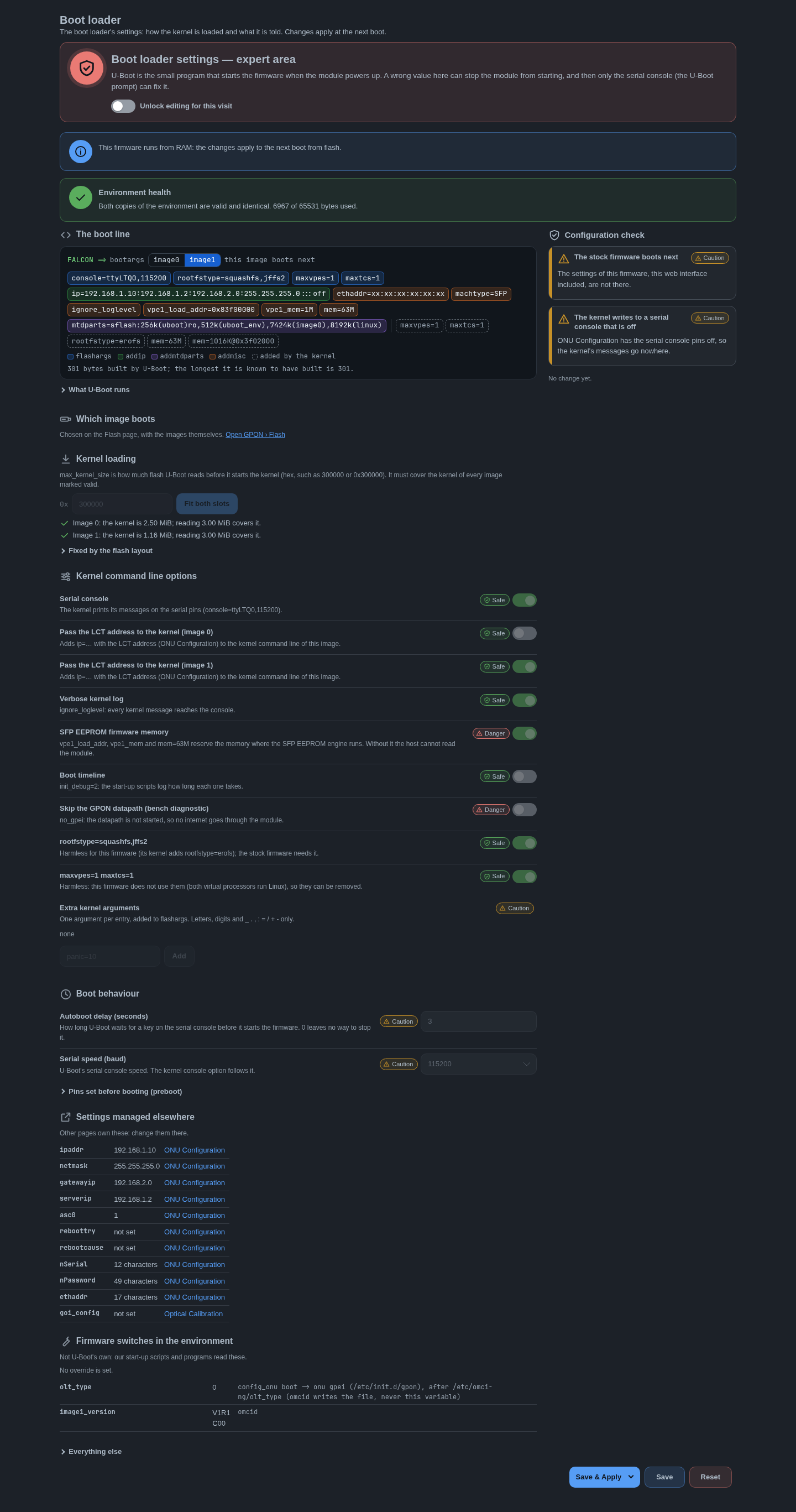
      Part of the Boot loader page: kernel command line options as switches, each marked Safe, Caution or Danger.
      Real page Boot loader (Expert). Every option a switch marked Safe, Caution or Danger.
      • Real page, example data The MIB explorer runs on the MIB module's own test document; the QoS section and the stills run on a simulated unit or on test fixtures. The entities, ports and rates on them are examples.

      The flash, looked after

      Sixteen megabytes hold the boot loader, its settings with the unit's calibration, and two firmware slots. GPON › Flash shows them as a map and lets you act on each part.

      • Health check. Reads the flash chip's own status and error-correction registers, read only: the part and its identity, bit errors it corrected, a program or erase failure it latched.
      • Data check. Scans the partitions for bit errors, checks each firmware slot (kernel checksum, root filesystem, release, packages) and compares the two slots.
      • Copy, resize, back up. Copy the running firmware to the other slot as a fallback, change the split between the two slots or use one large slot, and download a backup of the whole chip.
      Real page GPON › FlashThe map of the chip, a slot inspected and checked, the two slots compared, the copy and slot-size dialogs (opened, then cancelled), the chip's own health and a bit-error scan. Played at 1.2× speed; example data, and the firmware in the slots is an older build.

      The OpenWrt way

      • Every setting lives in UCI. /etc/config/gpon, sfp_eeprom, network: LuCI, the shell and the AI agent all change the same options.
      • One rule per option. Each option has one format and range, checked the same way by LuCI, the command line, the boot and the agent.
      • OpenWrt's own plumbing. The web backend is ucode and rpcd over ubus, services run under procd, and the OMCI daemon answers on ubus too.
      • A normal OpenWrt build. Clone OpenWrt, add the overlay, make menuconfig, make. A sysupgrade keeps your settings.
      # uci set gpon.ui.expert='1'
      # uci set gpon.onu.mc_vlan='40'
      # uci set sfp_eeprom.default.a0_source='auto'
      # uci commit
        the same options LuCI shows, the same checks

      09The AI agent API

      It talks to AI agents. Carefully.

      Some owners will never open a settings page. They will ask an assistant. So the stick carries an API written for one, and a reference the agent reads from the module itself.

      It is off until you switch it on, has its own login, and switches itself off after 24 hours idle.

      Every change is a trial. It reverts by itself unless it is confirmed. The one-way doors (the laser calibration, the boot loader, which slot boots) are refused, or need a flag the agent may pass only after you agree.

      Read · 13
      helpstatusstateeventstracelivegethistoryreportissueinspectwaittelemetry
      Change · 6
      tryconfirmrevertextenddorun
      Switch · 8, and the monitoring key
      timerbootoffclosefingerprintauthidledocmonitor_key

      Diagram The trial rule. The verb names are the API's own, counted from the reference the firmware generates and an automatic check compares with the code.

      28verbs
      131settings, each with its effect and its owner
      38status documents
      13kinds of event

      10Telemetry out

      Read-only, for your dashboards.

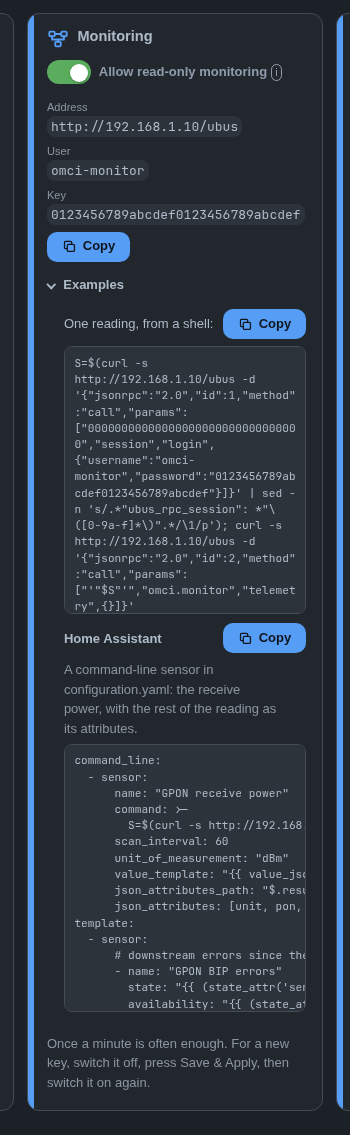
      A second key, for monitoring. It may call one read-only method and nothing else, so it is safe to hand to Home Assistant or any other monitoring tool; the Home Assistant recipe is on the page and in the reference on the module.

      One answer carries the PON state, the optics, the link, the error counters, a minute of traffic and the services.

      It never carries the serial number (only its four-letter maker prefix), the passwords, the LOID, the MAC address or the calibration.

      The Monitoring card of the PON Logger page: the switch, the address, the user and the key, and ready-made examples for a shell and for Home Assistant.
      Real page Monitoring, on the PON Logger page. The switch, the address, the user and the key, with examples to copy for a shell and for Home Assistant. The key shown is an example.

      11The receipts

      Eleven is the part you can check.

      Loud claims are cheap. This project keeps receipts. No image is released until every automatic check passes, and a check that cannot run counts as a failure. Mutation tests break the code on purpose to prove the tests notice.

      ~330automatic checks an image must pass before it is released.
      213behaviour and mutation test runs, plus 41 quick checks, for r681.
      37recorded OLT sessions replayed through the OMCI engine and compared with their expected answers.
      857written specs.
      426documented tools, their limitations included.
      3,258commits so far.
      1. Every difference has a written reason.The GPON drivers were updated to run on Linux 6.18. Wherever they behave differently from the original, the difference is in a register with its reason: a decision, never a mystery.
      2. Vacuous is not a pass.A check that cannot tell “no signal” from “not measuring” reports a broken probe, never a verdict.
      3. Tested on real fibre.Peter-Pon has carried real GPON traffic for months, and testers on their operators' lines have sent 88 reports so far.
      • Counted The automatic checks are the numbered sections of the release script; the test runs and quick checks are those of the r681 release. Its mutation tests alone took 7,414 seconds.
      • For example On an early fibre run the session dropped every 18 seconds or so. The cause was ours: one interrupt handler where the original driver has two. It was split again, and an automatic check now stops the build if anyone merges it back.

      Make it yours

      Take it further.

      1. Improve it.Pull requests are welcome: a fix, a better page, support for another stick.
      2. Share it.Pass it on to anyone with a GPON stick in a drawer.
      3. Fork it, port it.Take it to other platforms and make it yours.
      4. Credit it.If you build on Peter-Pon, a credit to the project and a link back to it are much appreciated.

      Credits

      Built on other people's work.

      • Wacke Caofor the firmwares he released for the MA5671A and its sister modules, among them 基于新版固件修改 (beta 2026.08.14), whose userland Peter-Pon started from, and his omci-utils, the base our omci-utils-ng grew from; and for testing Peter-Pon on his own fibre.
      • Daniil (shteudguy)for testing Peter-Pon on his own fibre; his reports found real bugs.
      • Anthropicfor creating Claude, the AI that built this firmware together with us. This project would not have been possible without it.
      • SpaceX AIfor creating Grok, and for the compute Claude runs on.
      • The OpenWrt projectthe operating system and the web interface (LuCI) this firmware is built on.
      • Anime4000for his fixes and improvements to the Lantiq and Realtek GPON module firmwares, when agentic AI was not yet a thing.
      • The people who published sources and firmwares along the way鲜牛奶 (Fresh Milk), 色铁 and 封印帝国, whose work Wacke Cao's firmware builds on, T-0's calibration recovery, Carlitoxx's V1 firmware, and more.
      • The FALC ON chipthe silicon all of this runs on.
      • Open PON Foundationa vendor-neutral effort for open, interoperable and privacy-respecting PON.
      • hack-gpon.organd the OpenWrt forum, where most of what is known about these modules was first written down.